December 02, 2006
It's wireless, why don't I see the Internet?
You got a shiny wireless notebook computer, booted it up and tried to get on the Internet and nothing! It's wireless, so why doesn't it work?
Not like the movies, eh? In movies people open a notebook computer absolutely anywhere (in the middle of a desert even) and are online in seconds, lightning fast, you never see a wire of any sort... then they save the world with a few key strokes... As I said, that's 'in movies'!
Here are the things you need to connect to the Internet (wirelessly or wired).
- Internet Service Provider account that offers broadband/high-speed connection to the internet. That can be the cable company (cable) or the telephone company (ADSL). There are more options, but not for this discussion.
- Cable modem or ADSL gateway.
- Wireless router (also called access point). For cable, get a router that also takes network wires for older equipment. -----> the router and modem can a combination in one unit.
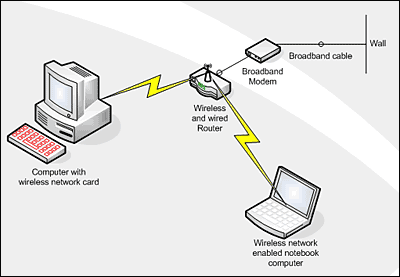
Tomes have been written about wireless networking and there is a lot to know. But you can keep it really simple!
Read the installation information in the manuals that come with the router/modem, that is one time where it pays to read the instructions.
The one thing you need to know is that the cable modem or ASDL gateway must be in between the wall outlet and the router.
The modem is like the funnel that funnels the Internet information to the router, the router distributes it to one or more computers through wireless broadcasting or wired connections. Windows XP more or less recognizes available connections automatically when you boot up. So when everything is plugged in the correct way your computer will 'see' the Internet.
Here is some more info about wireless network setups or ADSL guides.


